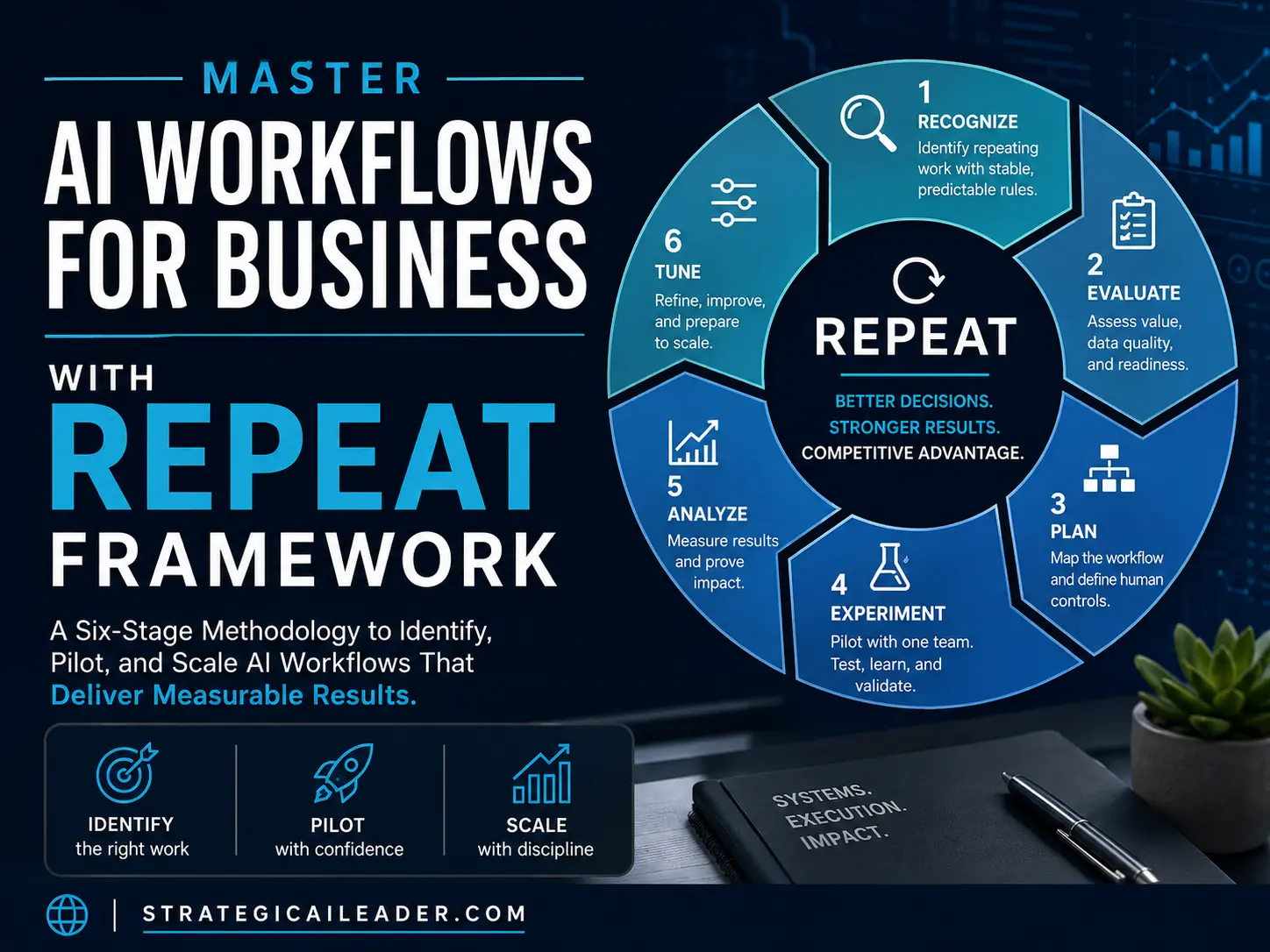
Master AI Workflows for Business with REPEAT Framework
Most AI Workflows for Business fail because companies automate the wrong work. After reviewing multiple AI implementations across sales, operations, and marketing, I noticed the same pattern.
Moreover, successful projects rarely depended on having the newest model. They depended on choosing the right workflow, documenting it clearly, and measuring results. They expanded only after the pilot proved reliable.
Furthermore, every successful implementation followed a similar sequence. However, every failed implementation skipped one or more of those steps.
Consequently, that observation became the foundation for the REPEAT Framework.
The model is rarely the main problem. Ultimately, weak process selection, poor data, unclear ownership, and missing success metrics create the failure.
This article teaches REPEAT, a six-stage methodology for identifying repeating work worth automating, piloting reliably, and scaling responsibly.
You will learn when automation makes sense.
Additionally, how to structure pilots, what to measure, and how to communicate changes to your team.
The framework emerged from multiple implementations where success followed a consistent pattern for AI Workflows for Business.
Companies that executed all six stages reliably deployed workflows.
Otherwise, companies that skipped stages reliably failed.
Why Most AI Workflow Projects Fail
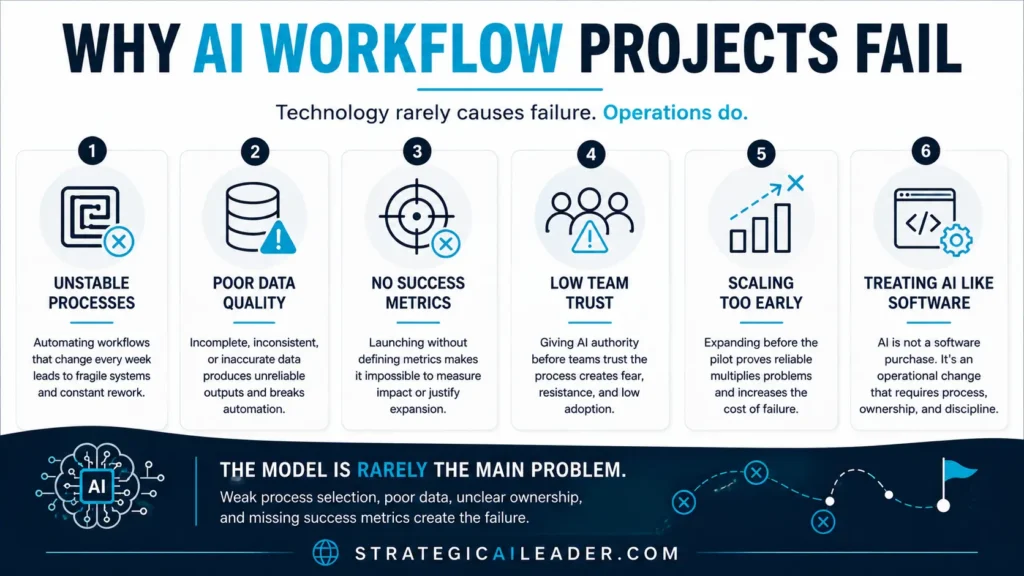
Most failed AI initiatives don’t fail because the technology is weak. They fail because organizations skip operational discipline.
The most common causes include:
- Automating unstable workflows that change every week.
- Using incomplete or inconsistent business data.
- Launching without defining success metrics.
- Giving AI authority before employees trust the process.
- Expanding before the pilot produces repeatable results.
- Treating AI as a software purchase instead of an operational change.
The REPEAT Framework addresses each of these failure points in sequence.
The Strategic AI Workflow Maturity Model
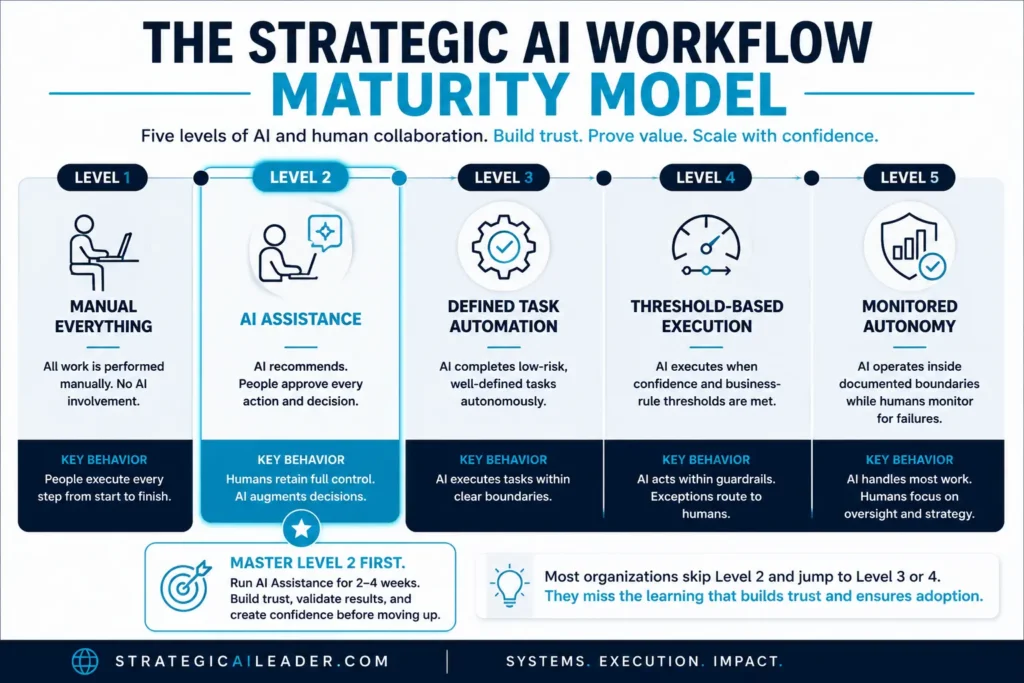
I mapped five maturity levels after watching AI automation break inside real workflows. Early attempts jumped straight to autonomous execution. That failed. The boundary between human judgment and AI action became the design problem instead of the solution.
Level 1 (Manual): People do everything. No AI involvement.
Level 2 (AI Assistance): AI recommends, people approve every action. This is where most production systems live. It’s slow but safe.
Level 3 (Defined Task Automation): AI completes low-risk tasks alone. The tasks are bounded and reversible. Still requires human monitoring.
Level 4 (Threshold-Based Execution): AI executes when confidence thresholds and business rules are met. This is where the maturity question shifts from technical to organizational: who defines the thresholds? When do they get revised?
Level 5 (Monitored Autonomy): AI operates inside documented boundaries while people watch for failures. No approval required, but monitoring must be active.
The gap between L3 and L4 took months to clarify. L3 feels like automation. L4 requires governance.
Most companies jump to Level 3 or 4. They skip the learning that happens at Level 2. Master Level 2 first. Run it for two to four weeks with your pilot team. Let them see automation working correctly, ask questions, and build confidence before forcing autonomous decisions.
The REPEAT Framework: Six Stages
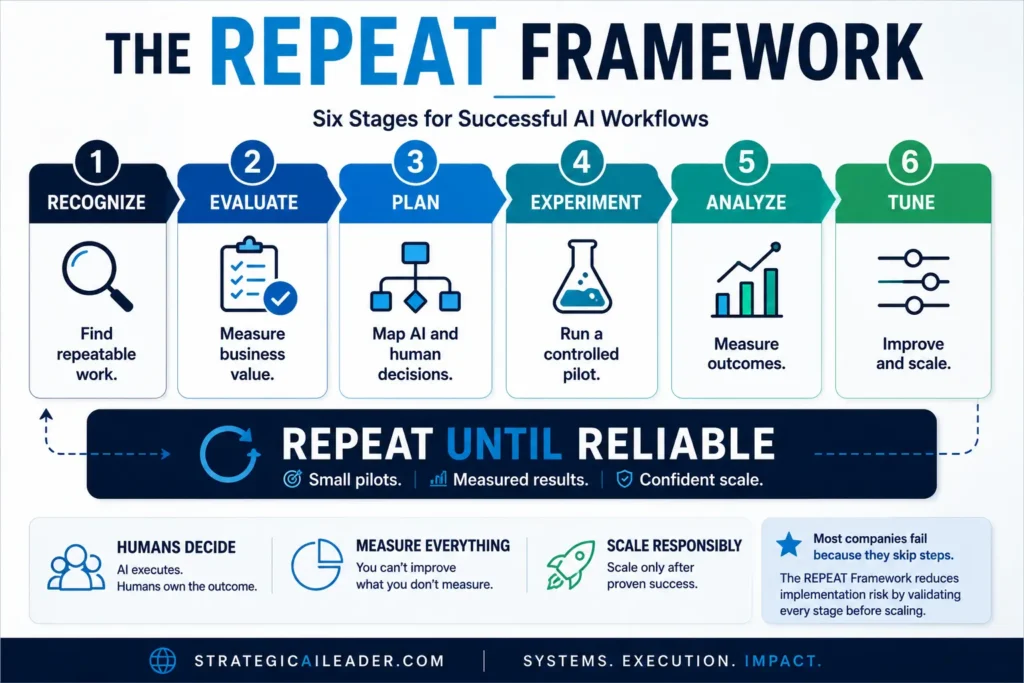
Recognize
Purpose: Identify repeating work with stable, predictable rules.
Leadership Question: What gets done the same way every time?
Required Actions: Ask teams where they copy data between systems, which tasks repeat daily or weekly, which work feels predictable versus creative.
Common Mistake: Automating work that sounds repetitive but changes weekly. If the process changes weekly, wait. Stable processes automate well. Chaotic processes break.
Measurable Output: A documented workflow with trigger, inputs, steps, and output.
Decision Gate: Proceed only when the process is stable enough to document.
Evaluate
Once you’ve identified a stable workflow, the instinct is to automate it immediately. I did that. It was wrong.
The actual question is sharper: does automation produce enough value to justify the effort? Because not every workflow worth automating is worth automating first.
I learned this by building something nobody needed. We automated a workflow that ran once a month. Beautiful automation. Saved three hours. Cost us two weeks to build. That was not a good return.
Now I calculate first. And I calculate against several dimensions because one number lies.
Volume matters. How many times does this happen monthly? I look at 180 triage requests daily across our operation. That’s not small.
Time per instance matters. Each one takes about six minutes. So 180 × 6 = 1,080 minutes daily. That’s 18 hours. Multiply by five days, and we’re at 90 hours weekly in triage work. That’s real.
Business value matters. I ask the operator teams: does this work directly prevent revenue loss or create revenue? Triage misses cost us customer attrition. So yes, it matters.
Data quality matters. I learned this the hard way. The first automation attempt failed because the input data was incomplete. Now I audit the data before building anything.
Error cost matters. What happens when automation breaks? If triage routing fails, tickets vanish. That’s a catastrophic failure mode. So error recovery has to be built in, which adds complexity.
Team readiness matters. Will people trust it? Our teams were skeptical. That skepticism was justified. It took three iterations before adoption was real.
When I modeled a 25 to 30% time reduction (conservative based on manual testing), the math suggested 22.5 to 27 hours per week were freed up. But that’s modeled, not measured. Real improvement came in, but slower than the math predicted. The last 10% took twice as long.
The calculation is useful. But it’s a starting point, not a prediction.
Plan
Teams often rush directly into prompting. Successful teams spend more time mapping the workflow than writing prompts.
Purpose: Map the workflow step by step.
Leadership Question: Where should humans retain control?
Required Actions: Document trigger, inputs, AI actions, system actions, human decisions, review points, escalation paths, manual fallback, and output. For each step, decide: AI performs this, System automates this, or Human decides this.
Example workflow: Customer email arrives. System logs request. AI classifies topic and urgency. System checks confidence threshold. If confidence exceeds a set threshold (illustrative example: 85%), request routes automatically. If below threshold, human reviews. Confidence thresholds require testing against real data. Do not copy an 85% threshold without validating error cost and risk.
Common Mistake: Planning without testing boundaries. Teams debate each decision point on paper, but testing reveals which assumptions hold and which require adjustment.
Measurable Output: Workflow diagram with decision points, human controls, and escalation paths.
Decision Gate: Proceed only when human authority and fallback paths are clear.
Experiment
Even well-designed workflows contain hidden assumptions. Pilots exist to expose those assumptions before they affect customers.
Purpose: Test the workflow with one team before rolling out.
Leadership Question: Does this automation work as intended? Required Actions: Select one stable, high-volume workflow and one trusted team. Assign a team champion. Define success metrics before launch. Run the pilot for three to four weeks. Why this duration? Workflow volume affects timeline. High-frequency work surfaces edge cases faster. Low-frequency work requires longer testing.
Common Mistake: Compressing pilots to two weeks. Edge cases emerge over time, not on schedule. Two-week pilots miss critical scenarios. Stopping early means discovering problems in production.
Measurable Output: Before-and-after metrics for task volume, time per task, accuracy, rework rate, override rate, and adoption.
Decision Gate: Proceed to Tune only if metrics meet predefined thresholds.
Analyze
After three months of automation, we needed to know: did it actually work?
I assumed the answer was yes. The logs showed efficiency improvements. The team reported faster processing. So I built a dashboard tracking everything. Volume, speed, accuracy, rework, overrides, adoption.
Then I looked at the numbers. And they lied.
Our metrics showed 25% faster processing. Except the team was still drowning. Because I was measuring the wrong thing.
I was measuring throughput. What I should have measured was what happened to the problems we were trying to solve.
Let me explain what went wrong.
The workflow saved about 10 hours of manual work each week. Beautiful. Except the team didn’t use those 10 hours for revenue-producing work. They used them to process more volume. So we were faster, but not smarter. We were busier, but not better.
That’s when I realized the difference: time returned is not the same as jobs eliminated. Returned time is just opportunity. You have to define what it becomes.
So I went back and asked the team: if this automation had actually freed up 10 hours per week, what would you do with them? And they said: actually talk to customers about their real problems instead of triaging tickets all day.
That changed the measurement.
Now I tracked the before-and-after against the actual outcome we wanted: fewer recurring customer problems.
Same automation. Different measurement. Completely different story.
The metrics I now care about:
Task volume. Did we process the same amount? Yes. Then something is wrong with the efficiency claim.
Time per task. Did it drop? By how much? 6 minutes to 4.5 minutes. Measurable.
Accuracy. Did automation make errors worse? This is critical. The override rate jumped from 2 percent to 8 percent. That mattered more than speed.
Rework rate. How many automated decisions had to be manually redone? 12 percent. That’s not acceptable. We iterated on the schema.
Adoption rate. Did people trust it? Only 65 percent adoption in month one. That told me the error signals weren’t clear enough. When automation fails silently, people stop using it.
Customer impact. Did the original problem improve? Did complaint volume drop? Response time improve? Here’s where I got honest: incrementally. Not dramatically.
The common mistake I made was measuring outputs when I should have measured outcomes.
Volume looked good. Speed looked good. But the actual problem—customers calling back with unresolved issues—only shifted by 8 percent in three months. The efficiency didn’t translate to customer impact.
That’s when I realized the automation was solving my scheduling problem, not the customer’s problem.
Second iteration focused on accuracy and override signals first. Speed second. Adoption third. Customer impact fourth.
That reordering took me six weeks to adjust. But it changed everything about how I measured success.
The dashboard now compares baseline to current state. But it’s organized by outcome, not by output. Volume has become a supporting metric, not the primary one.
Decision gate: I proceed to refinement only if two conditions are met. First, adoption stays above 80 percent. Second, customer complaint callbacks drop month-over-month. Everything else is supporting evidence.
If neither condition is true, I rebuild the automation logic.
Tune
Purpose: Refine based on pilot feedback.
Leadership Question: What needs to improve before we expand? Required Actions: Review incorrect outputs, missing context, weak prompts, data-quality failures, and repeated exceptions. Update prompts, routing rules, confidence thresholds, training, and failure procedures.
A team champion leads this work. This person represents the pilot team, documents workflow problems, collects employee feedback, tracks adoption, escalates failures, and reports results to leadership. Operational credibility and peer trust matter more than AI enthusiasm. Expand to a second team only after results remain stable across the first team. Measure that team. If results hold, move to full roll-out.
Measurable Output: Updated workflow components and results from second team validation.
Decision Gate: Proceed to full roll-out only if both pilot team and expansion team show consistent results.
A Verified Sales Workflow Result
A MyEListing sales system audit and AI implementation recorded improvements across lead response, CRM quality, pipeline conversion, and deal throughput. The results reflect the broader sales system initiative. Process design, data quality, routing rules, team adoption, and AI-supported workflows contributed to the outcome.
These results didn’t come from adding AI to an existing process. They came from redesigning the underlying sales workflow, improving CRM data quality, defining routing rules, and introducing AI where repetitive work existed. AI accelerated the system, but the system produced the outcome.
Lead Response Time: 48-hour baseline to 4 hours improved (91.7% faster, 12x faster). CRM Accuracy: 60% to 95% (35 percentage point improvement). MQL-to-SQL Conversion: 12% to 27 percent (15 percentage point improvement, 2.25x the baseline rate). Deal Throughput per Representative: +20 percent. Revenue Signal Quality: Moved from unreliable to board-ready.
Every implementation is different. These numbers reflect one organization’s sales system and should not be treated as expected outcomes for every business. The lesson is not the percentage improvement. The lesson is that disciplined workflow design consistently produces measurable operational gains.
Source: MyEListing internal data, Sales System Audit + AI case study. Results reflect the full sales system initiative.
Three Complete Workflow Examples
Sales Lead Triage
Business Problem: Manual lead scoring consumes hours weekly.
Trigger: New lead arrives.
Inputs: Company name, size, industry, budget signals, contact history. AI Action: Score by company fit and conversion probability.
System Action: Assign to queue based on score.
Human Decision: Rep reviews high-priority leads and decides follow-up.
Output: Ranked leads in CRM.
Pilot Metrics: Lead response time, assignment time, rep adoption.
Manual Fallback: Reps can manually override AI scoring.
Customer Request Routing (Illustrative)
Trigger: Customer email arrives.
Inputs: Email body, account history, request history.
AI Action: Classify topic and urgency.
System Action: Check confidence threshold. High-confidence, low-risk requests route automatically. Uncertain requests go to human review.
Human Decision: Person determines routing and escalations.
Output: Request in correct team queue.
Pilot Metrics: Routing accuracy, assignment time, rework rate, customer satisfaction.
Manual Fallback: Reps can reassign if AI misunderstood intent.
Meeting Action Tracking (Illustrative)
Trigger: Meeting ends.
Inputs: Transcript or notes.
AI Action: Summarize decisions and extract action items with owners and due dates.
System Action: Move approved actions into project management system.
Human Decision: Meeting owner reviews and approves output.
Output: Documented actions with owners and deadlines.
Pilot Metrics: Documentation time spent, percentage of actions with owners, percentage with deadlines, correction rate, on-time completion.
Manual Fallback: Manual documentation by meeting organizer.
Why Data Quality Matters More Than Prompt Quality
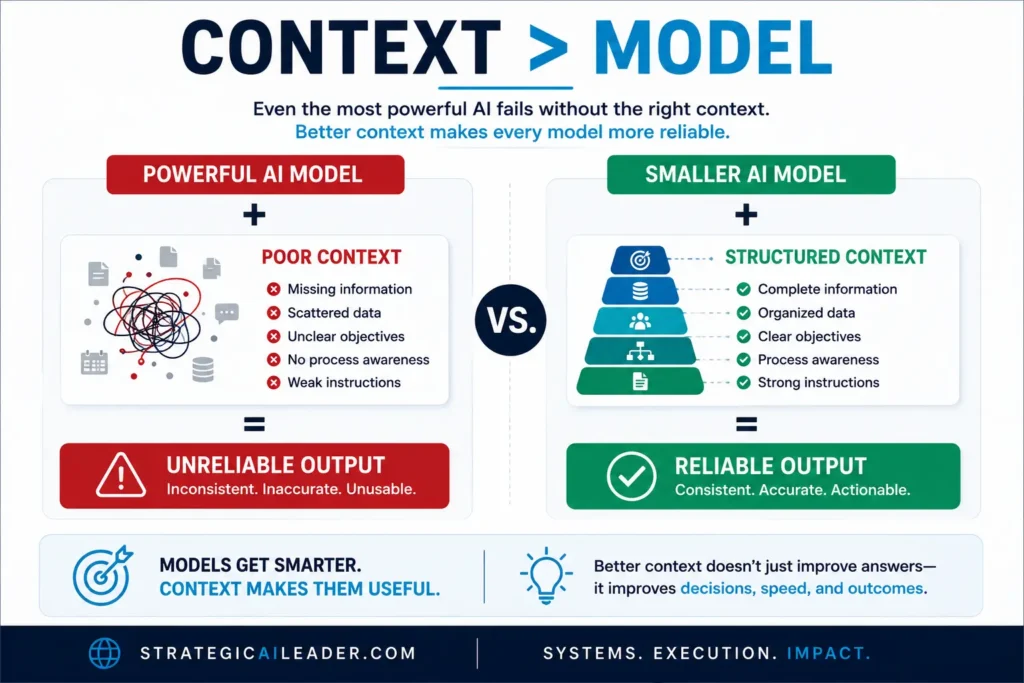
I assumed prompt quality would break automation. Data quality broke it instead. Strong prompts do not repair missing CRM fields. Weak context produces weak classifications. Inconsistent naming damages routing. Missing ownership rules create stalled work. Incomplete account history weakens recommendations. Prompts should document: Role, Objective, Required context, Rules, Output format, Examples, Confidence requirements, Escalation conditions, Prohibited actions, Prompt version. Require prompt testing and version control. Do not assume one prompt works across all teams or data states.
One Lesson I Learned
| Early in my own implementations, I assumed prompt quality would determine success. I spent hours refining prompts while ignoring inconsistent CRM fields, duplicate account records, and missing ownership rules. The prompts kept improving, but the workflow didn’t. Once we standardized the underlying data and clarified process ownership, the same prompts immediately produced more reliable results. That experience permanently changed how I approach AI implementations. |
How to Communicate AI Workflow Changes
Answer these five questions: What work will change? Which repetitive steps will AI perform? Which decisions will employees retain? How will results be measured and shared? Where will returned time be reinvested? Core message: We are removing repetitive steps from your work. We are not removing your authority. The goal is to return time for higher-value work. Share hours returned, accuracy, rework, overrides, failures, adoption, and customer impact. Frame returned time as opportunity, not labor elimination.
When Not to Automate
Do not automate legal decisions, hiring decisions, performance judgments, medical decisions, financial approvals, or sensitive customer disputes. Do not automate safety decisions, unstable processes, or workflows with unreliable input data or unclear ownership. AI assistance remains appropriate in regulated workflows when qualified people retain authority and required reviews are enforced.
Five Actions This Week
- 1. Ask each team for three repetitive tasks completed weekly.
- 2. Calculate volume multiplied by time per task. Which task returns the most hours weekly?
- 3. Select one stable, high-volume, low-risk workflow.
- 4. Assign a trusted team champion.
- 5. Set a four-week pilot end date and define success metrics before launch.
The companies that win with AI won’t win because they licensed better models. They’ll win because they built reliable workflows that move faster than competitors. Use REPEAT to evaluate workflows specific to your business. The consistent application of these six stages transforms pilot learning into scaled automation. The durable advantage doesn’t come from model access alone. It comes from how your company turns models, context, systems, and human judgment into reliable execution.
AI models will continue to improve every year. Operational discipline will remain a competitive advantage regardless of which model leads the market. Organizations that consistently evaluate, pilot, measure, and refine workflows will outperform organizations that simply deploy new AI tools.
Frequently Asked Questions About AI Workflows for Business
What is an AI workflow?
An AI workflow is a repeatable business process where AI completes defined tasks such as summarizing, classifying, routing, or drafting. People retain authority over decisions involving customers, employees, money, compliance, safety, and reputation.
Which AI workflows should a business automate first?
Start with stable, high-volume, low-risk work. Strong starting points include sales lead triage, customer request routing, meeting action tracking, document summaries, and routine status updates.
What is the REPEAT Framework?
The REPEAT Framework is a six-stage method for implementing AI workflows. The stages are Recognize repetitive work, Evaluate value and risk, Plan the process, Experiment through a pilot, Analyze results, and Tune before expansion.
How long should an AI workflow pilot run?
Most pilot programs should run for three to four weeks. Workflow volume, risk, and edge-case frequency should determine the final duration. Set an end date and success criteria before launching the pilot.
How should leaders measure an AI workflow?
Track task volume, time per task, cycle time, accuracy, rework, human overrides, employee adoption, customer impact, system reliability, and cost per completed task. Compare results with a documented baseline.
How should leaders communicate AI workflow changes to employees?
Explain which repetitive steps will move to AI, which decisions employees will retain, how results will be measured, and where returned time will go. Share successes, failures, overrides, and workflow changes throughout the pilot.
Subscribe to Strategic AI Leader for weekly frameworks on AI strategy, operations, leadership, and growth. Each article gives you practical systems, measurable decision tools, and lessons drawn from real implementation work.
Help Support My Writing
Subscribe for weekly articles on leadership, growth, SEO, and AI-driven strategy. You’ll receive practical frameworks and clear takeaways that you can apply immediately. Connect with me on LinkedIn or Substack for conversations, resources, and real-world examples that help.
About the Author
I’m Richard Naimy, an operator and product leader with over 20 years of experience growing platforms like Realtor.com and MyEListing.com. I work with founders and operating teams to solve complex problems at the intersection of product, marketing, AI, systems, and scale. I write to share real-world lessons from inside fast-moving organizations, offering practical strategies that help ambitious leaders build smarter and lead with confidence.
I write about:
- AI + MarTech Automation
- AI Product Development
- AI Strategy
- Context Engineering
- COO Ops & Systems
- Growth Strategy (B2B & B2C)
- Infographic
- Leadership & Team Building
- Marketplace Growth Strategy
- My Case Studies
- Personal Journey
- Revenue Operations (RevOps)
- Sales Strategy
- SEO & Digital Marketing
- Strategic Thinking
Want 1:1 strategic support?
Connect with me on LinkedIn
Read my playbooks on Substack
For the next step, use leadership for self-improving AI systems to set leadership controls around changing AI behavior.
For the next step, use AI workflow process to connect automation to defined workflow steps.