Vibe Coding Tools: What I Evaluate After a Year of Building
I’ve spent more than a year vibe coding. My starting point for choosing vibe coding tools is the work I need to finish and the effort required to reach a result I trust.
A working screen answers one question: does the application appear to work?
I need answers to several others. Does the code follow the project’s architecture? Do permissions behave correctly? Did the change break another workflow? Will another developer understand the result?
Generating code covers part of software delivery. Review, corrections, testing, and maintenance determine whether the work holds up.
My approach to tool selection follows those responsibilities. I define the project, establish acceptance criteria, and evaluate tools against the same work.
Here is what I look for and how I recommend applying the same discipline to your own projects.
What I Look for in Vibe Coding Tools
I evaluate five areas: project context, complete changes, execution permissions, review and handoff, and total delivery cost.
Those requirements help me separate an impressive demonstration from a useful development workflow.
For an existing application, I prioritize accurate changes across established dependencies. For an early prototype, I prioritize a usable experience and a clear path to continued development.
The phrase “vibe coding tools” covers products with overlapping capabilities. Some center on an editor. Others emphasize terminal work, delegated tasks, or application creation through a browser.
Developers also use these products for structured AI-assisted development. Specifications, tests, and human review shape the workflow.
I explain the broader distinction in The Truth About Vibe Coding and AI-Assisted Development.
Why I Define the Project Before Comparing Products
A feature list tells me what a vendor offers. My project tells me which capabilities matter.
Consider two requests.
The first involves a customer intake prototype. The requirements include a form, sample records, and a shareable preview for feedback.
The second involves changing customer permissions in an established application. The requirements include authorization rules, database behavior, API responses, interface changes, and regression tests.
Both involve building software. Each needs a different evaluation.
Before comparing products, I want a short project brief covering:
- The outcome.
- The existing codebase and technology stack.
- The affected workflows.
- The acceptance checks.
- The reviewer.
- The spending ceiling.
“Build a customer portal” leaves too many decisions unresolved.
“Add a customer portal using our existing authentication system, restrict access by account, and verify isolation between customers” gives the tool and reviewer a shared target.
Context comes before prompting. Architecture comes before implementation. The quality of the instructions influences the value of the output.
What Building CareNestHQ Taught Me to Evaluate
I built CareNestHQ through vibe coding to help families coordinate care in one shared space. The platform brings together medications, appointments, documents, tasks, and communication, with private, invitation-based access for family members and trusted helpers. Community Meals adds a meal calendar for people organizing support. One Calm Place for Family Caregiving
The coordination problem shapes my development requirements. A family needs to know who owns a task, which appointments need attention, and where to find care information. Those workflows need to work together.
For a product like CareNestHQ, a working dashboard gives me only part of the answer. My review needs to cover the relationships behind the screen. Does an invitation connect someone to the correct care space? Does a change preserve access boundaries? Do related records stay connected to the correct person?
Those are acceptance questions, rather than claims about a particular tool’s performance.
CareNestHQ gives my evaluation criteria a concrete purpose. I want coding tools to understand the project, make complete changes, respect permissions, and leave work I understand and maintain.
When you evaluate tools for your own product, start with the responsibilities your software carries. Turn those responsibilities into checks before comparing speed.
Five Requirements I Use to Evaluate Vibe Coding Tools
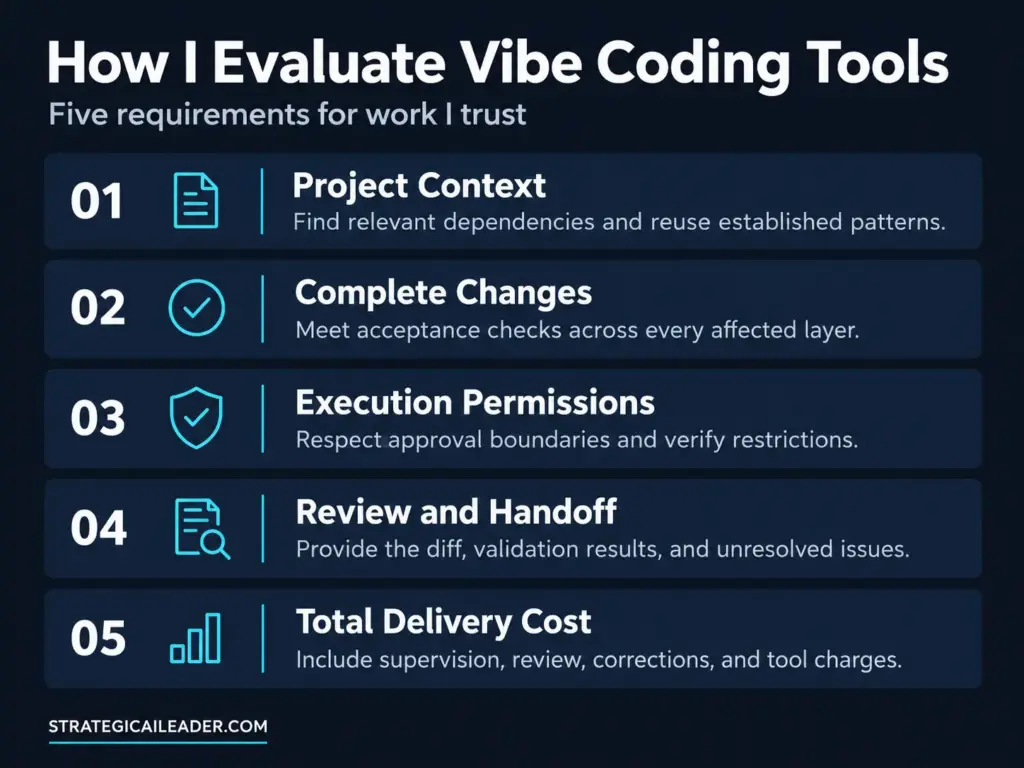
review and handoff and total delivery cost
1. Relevant Project Context
A coding agent needs the right information before making a useful change.
Access to a large repository does not prove the agent found the relevant dependencies. A large context window does not prove the agent understood the application.
I want evidence in the proposed approach.
Suppose the task involves adding a customer status field. The plan should identify the database schema, validation rules, API response, interface, and relevant tests.
The implementation should reuse established patterns.
I look for missing dependencies, invented functions, unnecessary replacements, and assumptions the code does not support.
An explanation deserves trust when the files support the explanation.
For your evaluation, ask the tool to identify the affected modules before editing. Then inspect whether the implementation follows the plan.
2. Complete Changes
Several plausible edits still might produce an incomplete feature.
Updating the interface while leaving the API unchanged creates a broken contract. Adding a database field without handling existing records creates another problem.
I want the whole change to meet the requested behavior.
My acceptance checks include whether the application builds, whether the feature works, whether relevant tests pass, and whether unrelated functionality changed.
I also examine scope.
A request to fix one form should not lead to an unexplained rewrite of authentication or a new dependency across the application.
For your pilot, keep tasks small enough to review fully. Give each candidate identical requirements and starting conditions.
Count a task as complete only after the reviewer accepts the result.
3. Permissions Matching the Work
Execution permissions deserve attention before an agent starts.
Reading project files, editing code, installing dependencies, changing a database, and deploying software represent different levels of responsibility.
I want those boundaries explicit.
A prototype using sample data has different requirements from an application connected to customer records.
Define which actions require approval. Then test whether the workflow respects those limits.
A product setting describes the intended behavior. A boundary test shows how the environment behaves.
For example, ask the agent to complete a task requiring an unapproved dependency installation. Observe whether the workflow requests permission and whether the environment enforces the restriction.
I discuss the broader delegation question in AI Agents vs Agentic AI. Tool selection needs to reflect who owns the decisions and consequences.
4. A Result Another Person Understands
A development workflow should survive a handoff.
I want four things with a completed change: the diff, a short explanation, validation results, and unresolved issues.
A conversation history offers background. The reviewer still needs a concise account of what changed and why.
Here is a practical test: ask another developer to review the result without reading the original conversation.
Track the time required and the missing information.
If the reviewer needs the original operator to explain every decision, improve the handoff before expanding the workflow.
The tool should support your AI workflow process, including how work moves between contributors, reviewers, and accountable owners.
5. The Cost of Accepted Work
Subscription price covers one part of the expense.
My evaluation also includes human supervision, review, corrections, usage charges, and project-specific hosting costs.
The meaningful question is how much effort the team spends reaching an accepted result.
A cheaper subscription loses its advantage when the workflow creates additional correction work.
I also want a clear exit path.
Where does the code live? How do I export the project? Which services require replacement after cancellation? Who understands the deployment?
Review data-handling terms under the specific plan you intend to purchase. Product-level descriptions do not establish plan-level protections.
How I Would Shortlist Today’s AI Coding Tools
Official documentation helps establish available capabilities. A project test establishes fit.
The following comparison reflects documentation reviewed on October 8, 2026. These are evaluation starting points, rather than performance rankings.
| Tool | Documented capabilities | What I would test |
|---|---|---|
| Cursor | Codebase search, file editing, terminal execution | Architecture consistency, complete changes, review effort |
| Claude Code | Codebase access, file editing, command execution across terminal, IDE, desktop, and browser surfaces | Context quality, execution boundaries, handoff |
| GitHub Copilot | Terminal agent work through Copilot CLI, alongside other Copilot workflows | Fit with existing GitHub practices and review processes |
| Devin Desktop, formerly Windsurf | IDE foundation and an Agent Command Center | Coordination effort, conflicting changes, ownership |
| Bolt | Agents for planning, writing code, and troubleshooting | Application behavior, project scope, maintenance path |
| Replit Agent | Code generation, infrastructure setup, and testing | Service ownership, deployment requirements, exit path |
The capabilities overlap. Claude Code extends beyond terminal use. Copilot includes terminal agent workflows. Browser builders offer capabilities beyond producing a static prototype. code.claude.com
Use the Cursor Agent documentation, Claude Code overview, and official Copilot CLI repository to verify capabilities relevant to your shortlist. cursor.com
I would avoid choosing solely by interface category. An editor-based product might handle terminal work. A browser-based builder might support ongoing development.
Your requirements need to settle the decision.
The Scorecard I Recommend for Comparing Vibe Coding Tools
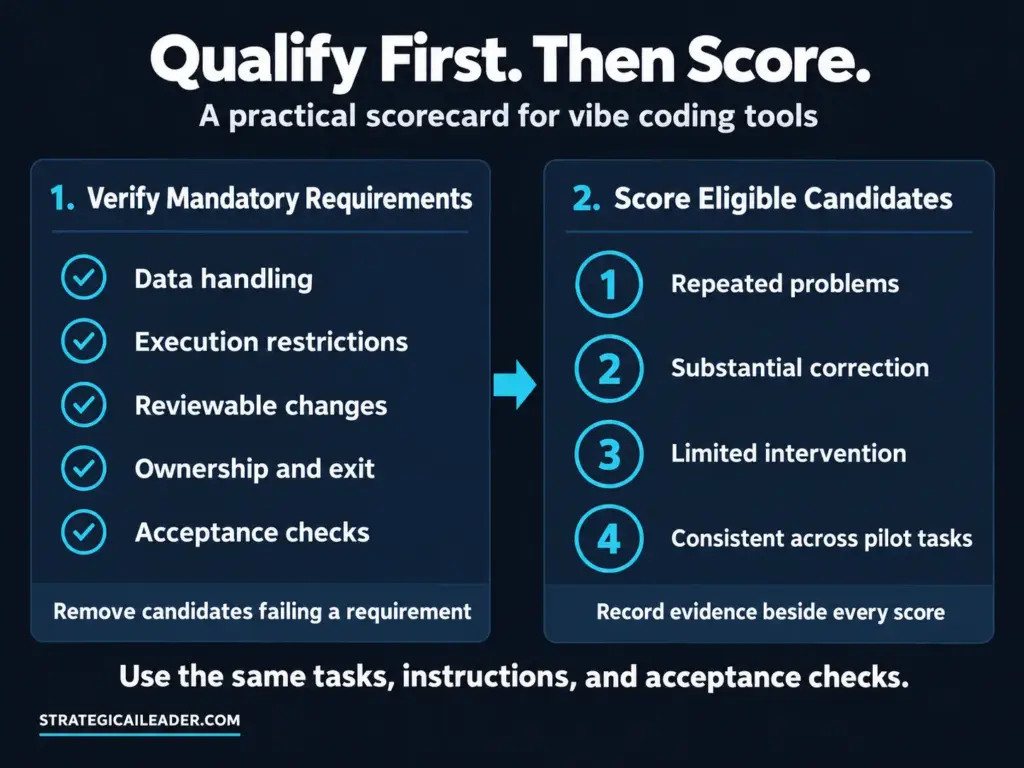
Start With Mandatory Requirements
| Requirement | Passing evidence |
|---|---|
| Required data handling | Applicable vendor terms and approved configuration |
| Execution restrictions | A boundary test showing the restriction works |
| Reviewable changes | A diff or equivalent review surface |
| Ownership and exit | Verified code access, export, and service ownership |
| Acceptance checks | Working behavior and relevant validation results |
Remove candidates failing a mandatory requirement. A favorable interface rating does not compensate for an unacceptable data-handling condition.
Score Eligible Candidates
Rate eligible candidates across the five evaluation areas.
| Score | Meaning |
|---|---|
| 1 | Repeated problems require substantial intervention |
| 2 | Meets the requirement after substantial correction |
| 3 | Meets the requirement with limited intervention |
| 4 | Meets the requirement consistently across pilot tasks |
Record evidence beside each score.
“Good context” offers little support.
“Found all five affected modules and reused the existing validation function” explains the rating.
I would use this scorecard to document quality and use total effort to compare candidates meeting similar standards.
Keep the evaluation repeatable. The same instructions, acceptance checks, and scoring rules make results easier to compare. Apply the same process standardization principles you would use elsewhere in your operations.
Why I Include Review and Correction Time
Consider a hypothetical pilot with two candidates and three tasks.
Both tools pass the mandatory requirements. Both finish all three tasks.
Candidate A produces its first attempts faster. Candidate B requires less human review and correction.
These figures illustrate the evaluation method. They do not describe my results or measured vendor performance.
| Pilot measure | Candidate A | Candidate B |
|---|---|---|
| Human setup and supervision | 75 minutes | 90 minutes |
| Human review | 90 minutes | 45 minutes |
| Human corrections | 120 minutes | 30 minutes |
| Total human effort | 285 minutes | 165 minutes |
| Allocated tool cost | $12 | $24 |
| Accepted tasks | 3 | 3 |
At a loaded labor rate of $80 per hour, Candidate A costs $380 in human effort. Adding tool costs brings the total to $392.
Candidate B costs $220 in human effort. Adding tool costs brings the total to $244.
Cost per accepted task equals $130.67 for Candidate A and $81.33 for Candidate B.
Candidate B costs approximately 38% less per accepted task in this example.
Higher tool charges still produce lower total delivery cost because the workflow requires less human effort.
Keep elapsed time separate from labor time. An agent running for an hour does not necessarily consume an hour of staff time.
How I Recommend Running Your First Comparison
accepted tasks and material defects
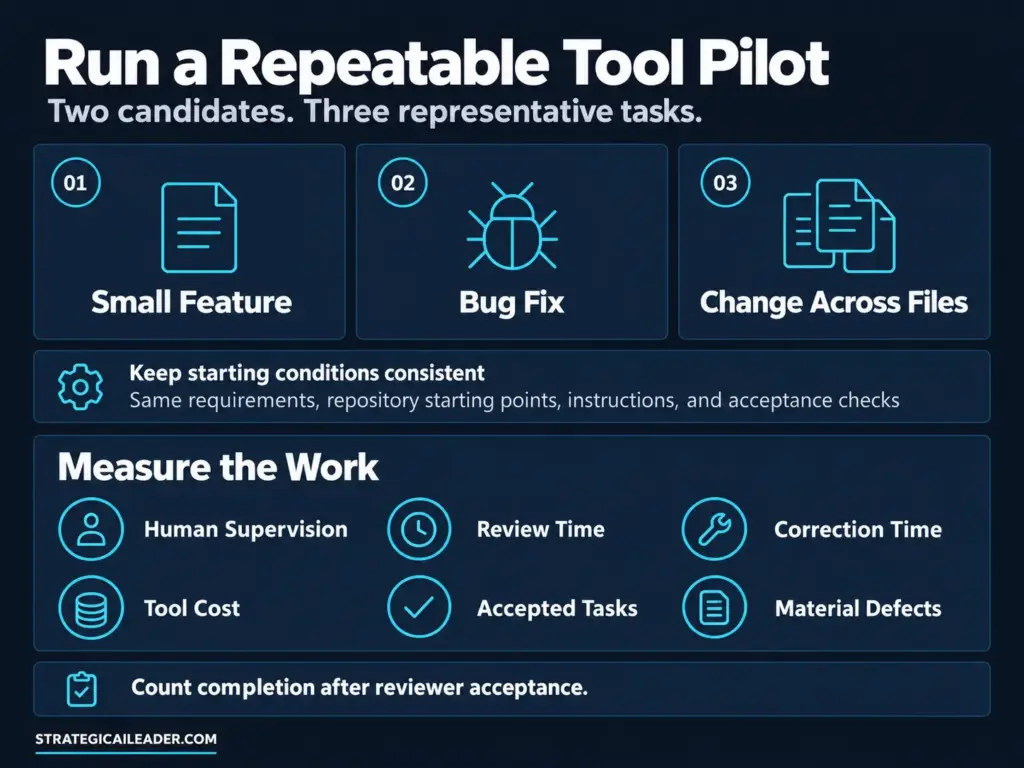
Choose two candidates and three representative tasks: a small feature, a bug fix, and a change spanning several files.
Use identical requirements, repository starting points, instructions, and acceptance checks. Work in separate branches or project copies.
Measure:
- Human supervision.
- Review time.
- Correction time.
- Tool cost.
- Accepted tasks.
- Material defects.
Repeat a task when the result looks unusual or the decision is close. A small pilot gives directional evidence rather than proof across every development task.
Set the owner, budget, and expansion criteria through your AI adoption roadmap.
When I Would Reconsider the Stack
I want a reason tied to the work.
Useful triggers include repeated incomplete changes, excessive review effort, spending beyond the agreed ceiling, or new data-handling requirements.
A project change might also justify another workflow. A customer prototype and an established application do not always need the same tool.
Give each additional tool a purpose, an owner, and a handoff requirement.
Overlapping subscriptions without distinct responsibilities create cost and coordination demands. An additional product should solve a named problem.
Questions About Vibe Coding Tools
Which Vibe Coding Tools Are Best for an Existing Codebase?
I would shortlist products supporting repository access, coordinated edits, validation, and review. Then compare the same tasks using accepted work, human effort, and project requirements.
Are Browser-Based Builders Suitable for Production?
Evaluate authentication, access controls, data handling, deployment, code ownership, and maintenance. The interface alone does not establish production suitability.
Should a Team Use Several Tools?
Add another product when a distinct requirement supports the expense and coordination. Assign an owner and measure the result.
What Matters Most in an Evaluation?
Accepted work, defects, and total human effort. Cost per accepted task helps compare workflows after candidates meet mandatory requirements.
What I Want From My Next Tool
After more than a year of vibe coding, I want a workflow supporting the full responsibility of building software.
The code needs to meet the requirements. The review needs to expose problems. The handoff needs to support continued development.
Before your next demo, write the project brief and acceptance checks. Compare candidates against the same work. Count the effort required to reach a result your team accepts.
Related Articles
Context Architecture: The Truth About Better AI Systems
Master AI Workflows for Business with REPEAT Framework
The Ultimate 10-Layer Architecture That Prevents AI Failures in Production
AI Cognitive Effects: Hidden Dangers and a Proven Framework
AI Disruption Risk Assessment: Protect Your Product Now
AI Workflow Process: Practical Solutions Leaders Need
The Truth About Vibe Coding and AI-Assisted Development
Unlock Better MarTech with AI Marketing Automation
Win With AI: A Proven 5-Step Guide for Founders
Remarkable AI-Assisted Development Hack Slashed Dev Time
Help Support My Writing
Subscribe for weekly articles on leadership, growth, SEO, and AI-driven strategy. You’ll receive practical frameworks and clear takeaways that you can apply immediately. Connect with me on LinkedIn for conversations, resources, and real-world examples that help.
I write about:
- AI + MarTech Automation
- AI Product Development
- AI Strategy
- Context Engineering
- COO Ops & Systems
- Growth Strategy (B2B & B2C)
- Infographic
- Leadership & Team Building
- Marketplace Growth Strategy
- My Case Studies
- Personal Journey
- Revenue Operations (RevOps)
- Sales Strategy
- SEO & Digital Marketing
- Strategic Thinking
Want 1:1 strategic support?
Connect with me on LinkedIn
Read my playbooks on Substack