A Friend Shared with me how a $2M AI Deployment Implode in 90 Days.
Richard Naimy
The CEO made one critical mistake.
He skipped AI task analysis.
He walked into the all-hands meeting, projected a slide titled ‘AI Transformation Roadmap,’ and spent 40 minutes talking about efficiency gains, automation targets, and doing more with less. By the time he finished, my friend said, half the room had mentally updated their LinkedIn profiles. The other half began documenting their work in case they needed to prove their value later.
The project collapsed before the first pilot launched. Not because of the technology. Not because of the budget. It collapsed because the CEO asked the wrong question: which jobs will AI replace?
Over the last few years, I’ve observed a clear pattern across companies deploying AI. Technically strong implementations often fail because leaders underestimate change management. At the same time, modest AI tools succeed when leaders redesign work around tasks instead of roles.
The pattern is consistent. Leaders who start with task analysis succeed. Leaders who begin with transformation rhetoric fail.
The leaders who win with AI aren’t asking about headcount reduction. They’re asking about task friction. Where does work get stuck? Where do talented people burn hours on grunt work that drains their energy? Where could we compress time, tighten feedback loops, or remove the stuff that makes everyone groan during standups?
Andrew Ng, founder of Google Brain and DeepLearning.AI, frames this perspective clearly: “I want an AI-powered society because I see so many ways that AI can make human life better. We can make so many decisions more systematically or automate away repetitive tasks and save so much human time.”
AI task analysis starts with that vision. AI is not a staffing decision. It is an operating decision. You are not replacing people. You are redesigning how work gets done.
Strong leaders own the redesign of work. They start with the unit of execution, the task, and build from there. What follows is a practical framework you can use to begin deploying AI safely, credibly, and productively inside your company, starting this week.
“AI isn’t a staffing decision. It’s an operating decision. You’re not replacing humans, you’re redesigning how work gets done.”
– Richard Naimy
Jobs Are Bundles of Tasks
Let’s reset the mental model for a second.
Jobs don’t exist to fill org charts. Jobs exist to produce outcomes. Revenue, customer satisfaction, product quality, whatever the mission demands. To get those outcomes, people execute tasks. Lots of them. Different types. Different complexity levels. Different stakes.
A job is a bundle of tasks. Some require deep expertise. Some require judgment. Some are repetitive but necessary. Some are high-risk. Others are time sinks that quietly drain energy.
AI operates at the task level, not the job level.
Andrew Ng has repeatedly and publicly stated that leaders should treat AI as a way to automate specific tasks within jobs, not eliminate jobs. AI improves efficiency and productivity by taking on selected tasks rather than entire roles.
That’s the shift. Stop thinking about jobs as monolithic things that either survive or disappear. Start thinking about the parts.
Take a marketing manager. One person, one job title. But look at the task inventory: draft campaign copy, analyze performance data, review creative assets, coordinate with sales, update the CRM, respond to stakeholder questions, build reports, and brainstorm positioning angles. Eight different types of work minimum. Some of those tasks are creative and strategic. Others? Data entry dressed up as “coordination.”
AI task analysis means breaking down that bundle and asking: which of these tasks could AI assist with? Which ones should stay fully human? Where’s the most significant time drain? Where’s the highest risk if we get it wrong?
You can’t answer those questions if you’re thinking at the job level. You have to zoom in.
Augmentation vs Automation: The Decision That Determines Success
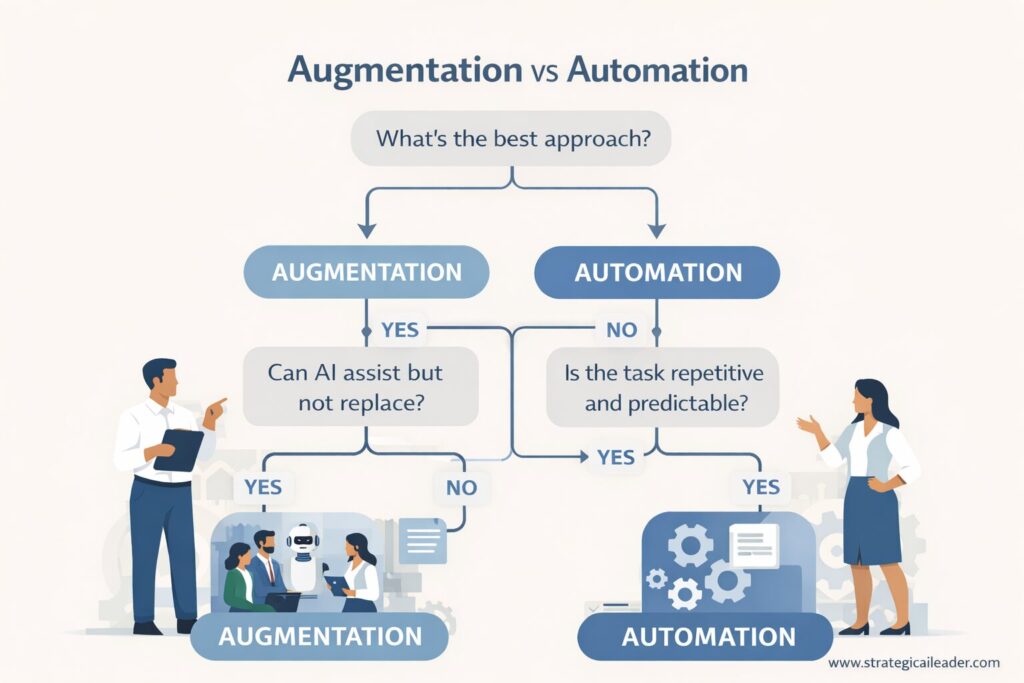
This decision tree helps leaders determine when AI should augment human work and when full automation makes sense based on task risk, judgment, and predictability.
Here’s the decision boundary every leader needs to get crystal clear on: augmentation versus automation.
Augmentation means AI assists humans. The person stays in the driver’s seat. AI speeds up the process, generates options, handles the first draft, but the human reviews, edits, approves, and owns the outcome.
Automation means AI executes end-to-end. No human in the middle. The task starts, AI completes it, and the outcome ships. Fully automated workflows work great for repetitive, low-stakes, rules-based tasks.
Most leaders get AI wrong by jumping straight to automation. They chase efficiency gains, headcount savings, and the ‘we automated X percent of the workflow’ headline. But automation introduces risk. When AI messes up, and no human catches it, you’ve got a customer problem, a compliance problem, or a trust problem.
Here’s my decision framework:
High judgment favors augmentation. When the task requires weighing trade-offs, understanding context, or making calls that could go multiple ways, keep a human in the loop.
High repetition favors automation. Running the same process a thousand times with the same inputs and the same expected output? Automation makes sense.
High risk requires human verification. Legal review, financial approvals, anything customer-facing with reputational stakes needs humans on verification duty.
Research from BCG on knowledge work shows that meaningful productivity gains occur when AI augments human work, and people remain responsible for review and refinement. Automation without oversight actually decreased quality in complex workflows.
Leadership insight: Most successful AI deployments start with augmentation. You build trust, you learn where the model struggles, and you develop the operational muscle to manage AI workflows before you hand over complete control.
“Feasibility without value is a science project. Value without feasibility is wishful thinking.”
The TASK Lens Framework
Alright, let’s make AI task analysis concrete. I’m giving you a named, reusable framework you can take into your next planning meeting. Call it the TASK Lens.
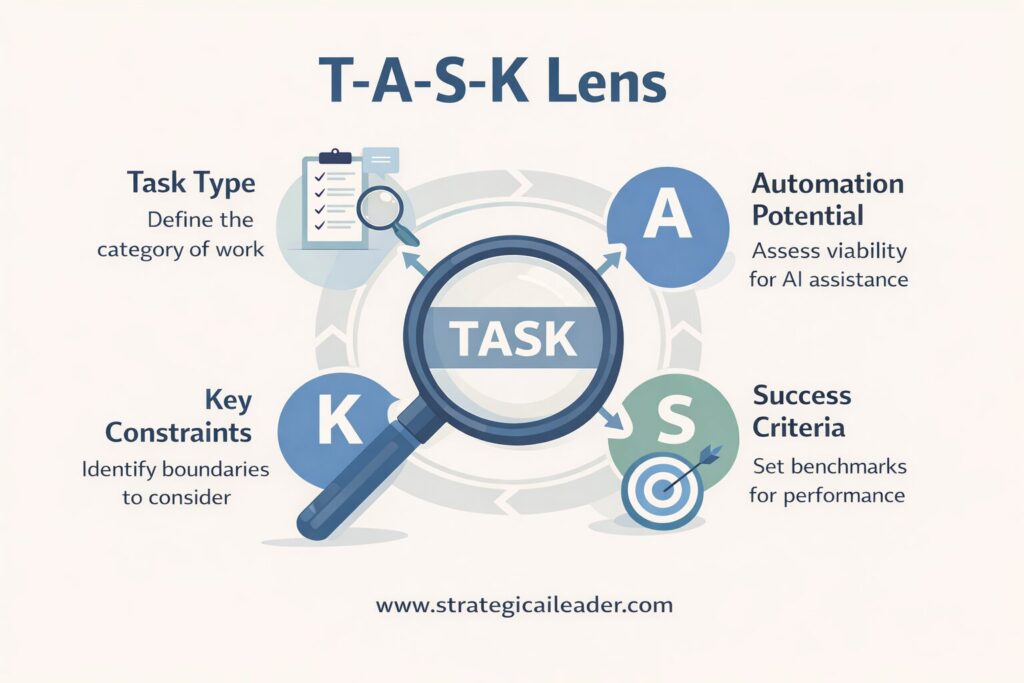
The TASK Lens helps leaders evaluate AI opportunities by analyzing tasks, automation potential, safety constraints, and success criteria before redesigning workflows.
T: Task Inventory
List every recurring task tied to an outcome. Don’t guess. Don’t assume. Sit with your team and map it. What do people actually do all day? What shows up in their calendar? What do they complain about? What takes longer than it should?
Build the inventory role by role . Get specific. “Manage customer relationships” isn’t a task. “Draft follow-up emails after discovery calls” is a task.
A: AI Potential Score
Evaluate each task on two dimensions: technical feasibility and business value. Can AI actually do the work? And if it can, does it matter enough to justify the effort?
Score each task. High feasibility, high value? That’s your pilot candidate. Low feasibility or low value? Deprioritize.
S: Safety and Risk Controls
Define where humans must review, approve, or override. Not every task needs the same level of oversight, but you need to be explicit. Where’s the escalation path? What triggers human review? Who owns accountability if something goes wrong?
Spoiler: accountability never transfers to AI. Ever. A leader owns the outcome.
K: KPI and Rollout Cadence
Measure cycle time, quality, and trust. You’re not running a science experiment. You’re running an operating improvement. Track the metrics that matter: how much faster did the task complete? Did quality stay the same or improve? Do people trust the output enough to use it?
Roll out in phases. Start small, measure, refine, expand.
The TASK Lens gives you a repeatable process for evaluating AI opportunities without falling into the hype trap or the fear spiral.
Evaluating AI Potential at the Task Level
Let’s zoom in on that AI potential score. You need two lenses here: feasibility and value.
Technical Feasibility
Ask these questions:
Is the task language or pattern-based? AI excels at tasks involving text, images, code, or recognizable patterns. “Read this document and summarize the key points” is a language-based instruction. AI can handle it.
Are inputs available and structured? AI needs data to work with when inputs are scattered, inconsistent, or locked in someone’s head; feasibility drops.
Is a first draft acceptable? AI is great at generating starting points. When the task does not require perfection on the first pass and a human can refine the output, feasibility stays high.
Here’s my simple heuristic: if a new hire could follow instructions to complete the task, AI probably can too. Not a perfect test, but a proper gut check.
Andrew Ng, who built Google Brain and led AI at Baidu, frames the feasibility question even more sharply: “If a typical person can do a mental task with less than one second of thought, we can probably automate it using AI either now or in the near future.”
One-second tasks. Document summaries. Data entry. Template-based responses. Email categorization. Status updates. Calendar scheduling. These are your high-feasibility candidates.
Business Value
Now flip to value. Feasibility doesn’t matter if the task doesn’t move the needle.
How often does this task occur? One-off tasks don’t generate enough value to justify the cost of AI. Recurring tasks do. Daily is better than weekly. Weekly is better than monthly.
How much time does it consume? A task that takes five minutes once a month? Skip it. A task that takes two hours every day? Now we’re talking.
Does it block higher-value work? Some tasks are small but critical. When drafting meeting notes prevents your team from starting actual strategy work, that’s a high-value target even if the time savings seem modest.
Decision rule: only tasks with both feasibility and value move forward. Feasibility without value is a science project. Value without feasibility is wishful thinking.
Using Task Libraries and Job Databases
Here’s a shortcut I wish more leaders knew about: job task databases.
Resources like O*NET, the U.S. Department of Labor’s occupational database, catalog thousands of jobs and break them down into detailed task lists. Think of it as a thinking aid, not a prescription.
I use these databases to spark discussion. Pull up the profile for a role on your team. Look at the task breakdown. Then ask: Does the list match what we actually do? What’s missing? What’s overweighted? Which tasks appear in the database but feel outdated given how we work now?
These libraries help surface hidden work. The stuff people do but don’t talk about. The invisible glue tasks that keep operations running but never make it into job descriptions.
Guidance: validate against real workflows. Never automate from a chart alone. Databases give you a starting point, not a finish line. The real task inventory comes from sitting with your team and mapping the work as it actually happens.
Framework in Action: Software Engineering Lead
Let me walk you through one complete example using the TASK Lens, from start to finish.
Role: Engineering lead on a product team of eight developers.
Step 1: Task Inventory
Sitting with the lead, we mapped recurring tasks:
Review pull requests and approve code merges (daily, 2 hours)
Draft technical documentation for new features (weekly, 4 hours)
Generate boilerplate code for API endpoints (daily, 1 hour)
Triage bug reports and assign priority (daily, 1.5 hours)
Update sprint boards (saves time but low complexity)
Moderate feasibility, high value:
Triage bug reports (AI can categorize, human assigns priority)
Low feasibility:
Code architecture reviews (requires deep system knowledge and judgment)
Step 3: Safety and Risk Controls
We established verification rules:
All AI-generated code must be reviewed and tested by humans before merging.
Documentation drafts need a technical accuracy check.
Bug triage suggestions go to the lead for final priority assignment.
Architecture reviews stay 100% human.
Step 4: KPI and Rollout
Week 1 pilot: AI generates boilerplate code for three new API endpoints. Lead reviews, tests, and commits. Time saved: 2.5 hours. Quality: identical to hand-coded versions.
Week 2 expansion: AI drafts documentation for two features. Lead edits for technical accuracy and clarity. Time to publish: 4 hours instead of 8.
Week 4 results: Combined time savings of 6 hours per week. The lead reallocates that time to mentoring junior developers and exploring new architectural patterns. Team morale improves because the lead is more available for complex problem-solving.
Lesson: AI removed prep work. The human retained ownership and elevated their contribution.
Your Turn: The 15-Minute Task Analysis Challenge
Stop reading for a second. I’m serious.
Open a blank doc right now. Pick one recurring task you did this week that annoyed you. Something that took 30+ minutes and made you think, “there has to be a better way.”
Answer these four questions:
Task name and frequency: What is it? How often do you do it?
Technical feasibility: Could a new hire follow instructions to complete it? (Yes/No/Maybe)
Business value: Does it block higher-value work or consume significant time? (Yes/No)
Risk level: What happens if AI gets it wrong? (Nothing/Minor issue/Major problem)
High feasibility + High value + Low-to-medium risk = pilot candidate.
Drop your task in the comments or tag me on LinkedIn. I’ll tell you if it’s a good AI candidate and what to watch out for.
Real-World Examples in Action
Let me share three quick, realistic examples showing how task-level AI creates measurable impact in different contexts.
Example 1: Support Intake
Scenario: Customer support team receives 500 inbound requests per week. Half are common questions with known answers. Response time averages 4 hours.
AI role: Augmentation. AI drafts responses to common questions based on the knowledge base. Support agents review, personalize, and send.
Results: Response time for common requests dropped from 4 hours to 45 minutes. Agent satisfaction improved because they spent more time on complex, interesting problems instead of copying and pasting the same answers repeatedly.
Revenue impact: Faster response time correlated with 12% improvement in customer satisfaction scores and 8% reduction in churn for customers who contacted support in their first 30 days.
Example 2: Marketing Execution
Scenario: Marketing team runs weekly A/B tests on ad creative. Previously, generating test variations took two days of copywriting and design work.
AI role: Augmentation. AI generates five creative variations in different tones and formats. The marketer selects two, refines messaging, and launches tests.
Results: Time to first test dropped from two days to four hours. Learning velocity tripled because the team could run three times as many experiments per month. Campaign performance improved 18% because they identified winning messages faster.
Cost impact: Reduced creative production costs by $4,000 per month while improving conversion rates.
Example 3: Ops Reporting
Scenario: The operations manager spends 6 hours per week pulling data from 5 systems and building status reports for leadership. Reports ship Friday afternoon, limiting leadership’s ability to make real-time decisions.
AI role: Automation with human review. AI pulls data from all systems, generates a draft report with key metrics and trend analysis, and flags anomalies. Manager reviews, adds context, and sends.
Results: Hours saved per week: 5. Decision latency improved from end-of-week to same-day. Leadership caught a supply chain issue on Tuesday instead of Friday, preventing a $40,000 delay in production.
Operational impact: Faster visibility into operations enabled three additional course corrections per quarter.
Contrarian Take: Start With Automation, Not Augmentation
Wait, didn’t I tell you to start with augmentation?
Let me flip that script for a second. For specific types of tasks, you should absolutely start with full automation, and here’s why.
Low-stakes, high-volume tasks are ideal candidates for automation. Data entry. File routing. Status updates. Notification triggers. These tasks have near-zero risk if AI gets them wrong, and they consume enormous amounts of time at scale.
Consider a typical logistics operation.
In many teams, someone manually updates tracking status in an internal system dozens or even hundreds of times per day. Every package scan requires manual entry. The work is repetitive, rules-based, and low risk.
In this scenario, full automation makes sense. The workflow can run end-to-end without human review. The result is fewer errors, significant time savings, and the ability to reassign that person to customer escalations where judgment actually matters.
The mistake most leaders make: they save automation for later, after they’ve built trust with augmentation. But you can build trust faster by automating tasks where the stakes are so low that even if AI fails spectacularly, nobody cares.
Pick three tasks this week that are:
Completely rules-based
Zero customer impact if they fail
High volume (done 50+ times per week)
Automate them. Don’t ask for permission. Don’t run a pilot. Just automate them and measure the time savings.
You’ll learn more about AI deployment in two weeks than in six months of cautious augmentation pilots on complex tasks. And when you’re ready to tackle the hard stuff, you’ll have operational confidence and a track record of success.
Analyzing Customers’ Tasks
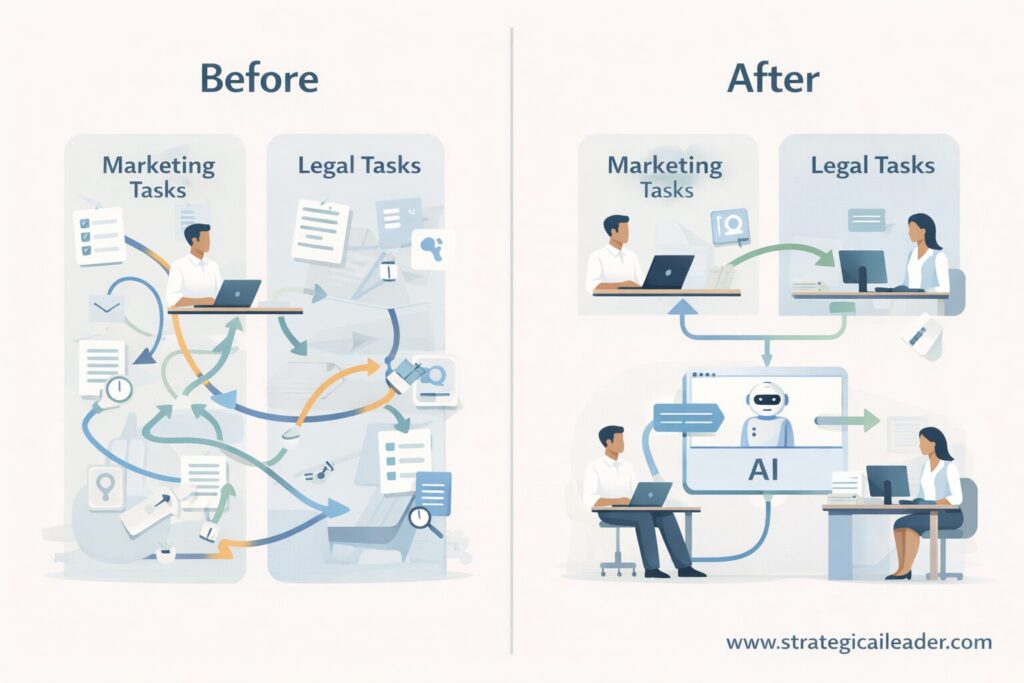
A before and after comparison showing how AI task analysis simplifies marketing and legal workflows by reducing handoffs, compressing cycle time, and keeping humans in control.
Most leaders stop at internal operations. Big mistake. Your customers have tasks too.
Customers don’t want your product. They want the outcome your product enables. They’re hiring your product to complete a job. When you can use AI to reduce customer effort, simplify their tasks, or remove friction from their workflow, you’ve created value they’ll pay for.
Customer Example: Business Website Launch
Outcome customer wants: Launch a simple business website that looks professional and attracts customers.
Customer tasks in traditional workflow:
Decide site structure and navigation (2 hours, high anxiety)
Draft homepage and service page copy (4 hours, blank page friction)
Choose design layout and customize (3 hours, decision paralysis)
Optimize content for search engines (2 hours, technical confusion)
Review everything before publishing (1 hour, second-guessing)
Total time: 12 hours. Total frustration: high. Abandonment rate for DIY website builders: 60%+ never publish.
AI-redesigned customer workflow:
Customer describes their business in 3-4 sentences.
AI generates site structure based on industry patterns.
AI drafts initial copy for all pages
AI suggests design layouts matched to the business type.
Customer reviews, edits, and personalizes (still 100% in control)
AI runs an SEO check and suggests improvements.
Customer publishes
New time: 3 hours. Frustration: minimal. Customer feels like they had a professional helping them, rather than fighting with a blank page.
Critical design principle: the customer stays in control at every step. AI doesn’t make decisions for them. AI removes the blank-page friction, provides options, and handles technical optimization. But the customer reviews, approves, and owns the final product.
Salesforce research shows that most customers are comfortable with AI assistance in service interactions, but trust drops sharply when decisions are fully automated. Perceived control and human oversight strongly influence customer acceptance.
Leadership takeaway: Customer trust depends on visible human agency. When you analyze customer tasks for AI opportunities, always ask: Does the AI preserve the customer’s sense of control, or does it feel like the AI is making choices on their behalf?
“The leaders who win with AI aren’t asking about headcount reduction. They’re asking about task friction.”
Workflow Analysis: Where Time Is Actually Saved
Here’s a truth most people miss: AI rarely removes steps. AI compresses time and tightens loops.
You’re not cutting tasks out of the workflow. You’re speeding them up, running them in parallel, or enabling faster iteration. The value shows up in cycle time, not step count.
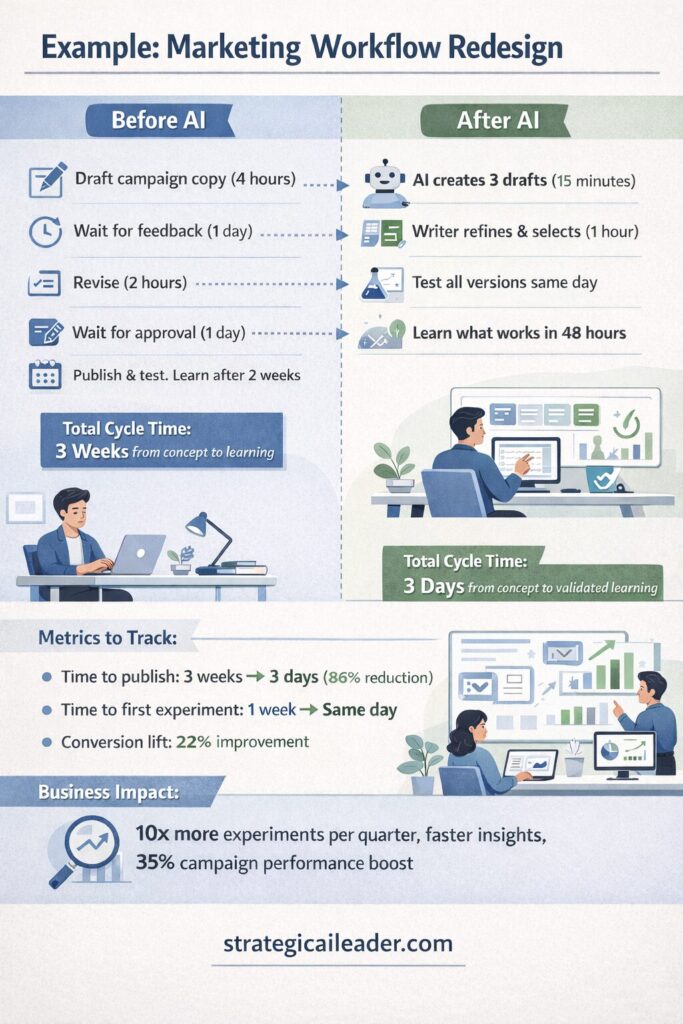
Example: Marketing Workflow Redesign
Before AI:
Linear drafting process. Writer drafts campaign copy (4 hours). Waits for feedback (1 day). Revises (2 hours). Waits for approval (1 day). Publishes. Tests. Learns what worked after 2 weeks. Repeats.
Total cycle time: 3 weeks from concept to learning.
After AI:
Parallel drafts. AI generates three versions of campaign copy in different tones (15 minutes). Writer picks the best, refines it (1 hour). Test all three in small batches on the same day. Learns what works in 48 hours. Iterates immediately.
Total cycle time: 3 days from concept to validated learning.
Metrics to track:
Time to publish: 3 weeks → 3 days (86% reduction)
Time to first experiment: 1 week → same day
Conversion lift: 22% improvement from faster iteration and testing
Business impact: The marketing team ran 10x as many experiments per quarter, identified winning messages faster, and improved overall campaign performance by 35%.
Before and after marketing workflow redesign using AI task analysis. Parallel drafting and faster feedback loops cut cycle time from three weeks to three days while improving experimentation velocity and conversion performance.
Example: Legal Review Workflow Redesign
Before AI:
Sequential review for all documents. Every contract, every agreement, every amendment goes through the same process. Junior associate reads it (30 minutes). Senior associate reads it (30 minutes). Partner reads it (20 minutes). Slow. Expensive. Bottlenecked.
Average review cycle: 3 days for standard contracts. Partner time consumed: 40% on routine reviews.
After AI:
Fast paths for low-risk documents. AI reviews standard contracts against approved templates (2 minutes). Flags any deviations from standard terms. Auto-approves perfect matches (60% of volume). Escalates modifications to human review. Complex or high-risk contracts go straight to senior reviewers.
Average review cycle: 4 hours for standard contracts, 2 days for complex contracts. Partner time on routine reviews: 5%.
Metrics to track:
Review cycle time: 3 days → 4 hours for 60% of contracts
Error rate: maintained at 0.2% (same as human-only process)
Senior reviewer time freed up: 35% increase in capacity for complex negotiations and strategic work.
Business impact: Legal team handled 40% more contract volume without adding headcount. Partner time reallocated to high-value client negotiations and M&A work.
Workflow redesign is where AI task analysis pays off. You’re not just making individual tasks faster. You’re redesigning the entire system around faster feedback loops and better resource allocation.
Human in the Loop by Design
Let’s talk governance. Every AI deployment needs clear rules about where verification is required, how escalation works, and why accountability never transfers to the machine.
Where Verification Is Required
High-stakes decisions. Customer-facing outputs. Financial approvals. Legal reviews. Anything where an error creates risk, harm, or reputational damage needs a human checkpoint.
You can automate data collection. You can automate drafting. But final approval? That stays human.
McKinsey’s 2025 research shows that only 6% of organizations qualify as AI high performers (those seeing 5% or more EBIT impact from AI), and these companies share a common trait: they redesign workflows with explicit human oversight before deploying AI.
How Escalation Should Work
Define thresholds. When AI confidence is below X, escalate. When the output deviates from the template, escalate. When the task involves a new scenario the model hasn’t seen, escalate.
Escalation paths need to be fast and transparent. Who gets the alert? How quickly do they respond? What happens if they’re unavailable? Build the escalation workflow before you launch the AI, not after something breaks.
Why Accountability Never Transfers to AI
Here’s the non-negotiable rule: a leader owns the outcome. Always.
AI is a tool. Tools don’t make decisions. People do. When an AI-assisted task produces a poor result, accountability lies with the person who deployed the AI, designed the workflow, and approved the output.
According to the NIST AI Risk Management Framework, organizations must maintain human oversight and establish clear lines of accountability for AI systems. The OECD AI Principles similarly emphasize that AI systems should include appropriate safeguards and human oversight mechanisms.
Governance isn’t optional. Governance is the foundation of responsible AI deployment.
“Trust is your operating system. When people don’t trust AI outputs or leadership’s intentions, the whole thing collapses.”
– Richard Naimy
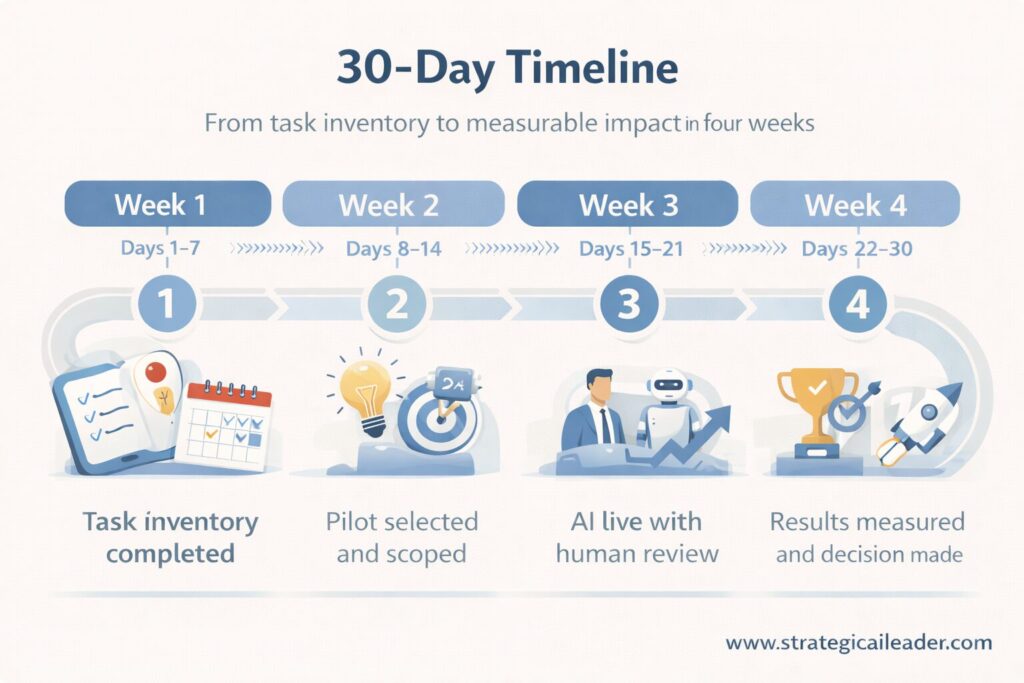
A Leader’s 30-Day Starting Plan
A 30-day, week-by-week plan showing how leaders move from task inventory to measurable AI impact through disciplined pilots and human oversight.
You want to start using AI responsibly inside your company? Here’s your 30-day plan with specific deliverables.
Week 1: Pick One Role and Inventory Tasks
Don’t boil the ocean. Pick one role. Preferably one with clear, recurring tasks and a team member who’s open to experimenting.
Sit down with them. Map every task they do in a typical week. Be specific. Use verbs. “Draft,” “review,” “analyze,” “coordinate,” “update.”
Deliverable: Task inventory spreadsheet with columns for task name, frequency, time consumed, and notes on complexity.
Week 2: Score AI Potential and Identify One Low-Risk Pilot
Run each task through the feasibility and value questions. Score them on a simple scale (high, medium, low). Find the intersection of high feasibility and high value.
Pick one task for a pilot. Low-risk. High-frequency. Clear success criteria.
Deliverable: Scored task list with pilot task selected and success metrics defined (what will we measure and what counts as success?).
Week 3: Deploy With Human Review and Track KPIs
Launch the pilot. Make sure the workflow includes human verification. Track one or two KPIs. Cycle time. Quality. User satisfaction.
Communicate what you’re doing. Don’t run silent AI experiments. Tell the team: “We’re testing AI on this specific task to see if it saves time. You’re still in control. We’ll review results together next week.”
Deliverable: Pilot running with daily or weekly KPI tracking. Keep a simple log of what worked, what didn’t, and any surprises.
Week 4: Review Outcomes and Decide Next Steps
Gather the data. Did cycle time improve? Did quality stay consistent? Did the person using AI feel more productive or more frustrated?
Decide: expand to more people, pause and refine the workflow, or kill the pilot if it didn’t work.
Deliverable: One-page summary with results, lessons learned, and decision on next steps (expand, refine, or stop).
Rinse and repeat. Build AI literacy and operational muscle one task at a time. No big transformation announcements. No all-hands fear spirals. Just controlled experiments that prove value before you scale.
Common Mistakes to Avoid
Let me save you some pain. Here are the mistakes I see leaders make repeatedly, and how to avoid them.
Don’t start with headcount reduction. When your first conversation about AI is “how many people can we cut,” you’ve already lost. Start with task improvement. Revenue growth. Customer experience. Headcount discussions come later, if ever.
Less than 30% of companies report that their CEOs directly sponsor their AI agenda, and those bottom-up, scattered AI initiatives have the highest failure rates. Leadership matters.
Don’t skip verification. Tempting, I know. You want full automation. You want the efficiency gains. But skipping human review on high-stakes tasks creates disasters. Verify first. Automate later.
Don’t automate without metrics. When you can’t measure the impact, you don’t know if it worked. Track something. Time saved. Error rate. User satisfaction. Pick a metric and watch it religiously.
Don’t roll out silently. Stealth AI deployments breed distrust. Communicate intent. Explain what you’re testing and why. Invite feedback. Make people part of the process.
Do communicate intent clearly. Tell your team: we’re using AI to improve how work gets done, not to replace people. Then prove it with your actions.
Do measure outcomes relentlessly. Data beats opinions. Track the metrics that matter and share the results transparently.
Do protect trust at all costs. Trust is your operating system. When people don’t trust AI outputs or don’t trust leadership’s intentions, the whole thing collapses.
The Leadership Shift AI Requires
Here’s the core idea one more time: AI works when leaders redesign work, not roles.
Task-level thinking separates experimentation from transformation. Experimentation is trying AI on a few tasks to see what works. Transformation is redesigning entire workflows, feedback loops, and operating models around what AI enables.
You don’t get to transformation without experimentation. You don’t get to innovative experimentation without AI task analysis.
Here’s what’s coming faster than most leaders realize: Your competitors are already running these experiments. According to Gartner, AI adoption among organizations jumped from 55% to 75% between 2023 and 2024. The gap between leaders who understand task-level AI deployment and those who don’t will become a competitive moat by 2026.
The companies that win over three years won’t be the ones with the most significant AI budgets. They’ll be the ones who figured out how to redesign work around tasks, built operational muscle through controlled pilots, and earned their teams’ trust by augmenting people instead of replacing them.
Companies that succeed with AI spend 50-70% of their timeline and budget on data readiness, workflow design, and governance before they even select AI tools. The winners don’t start with the technology. They begin with the task, the workflow, and the human oversight model.
AI isn’t a magic wand. AI is a tool that requires intentional design, transparent governance, and leadership willing to ask better questions. Not “what jobs will AI replace?” but “what tasks create friction, and how can AI reduce that friction while keeping humans in control?”
The choice isn’t whether to use AI. Market pressure and customer expectations already made that decision for you. The choice is whether you’ll use AI strategically or reactively, with intention or desperation.
Start this week. Pick one task. Run one pilot. Prove it works. Then scale.
Your competitors already are.
Want weekly frameworks on AI, operations, and leadership delivered straight to your inbox? Subscribe to the Strategic AI Leader newsletter. Let’s keep building more intelligent systems together.
Connect with me on LinkedIn for daily insights on AI strategy and operational excellence.
FAQs for AI Task Analysis
What is AI task analysis?
AI task analysis is the process of breaking down jobs into individual tasks and evaluating which tasks AI can assist with or automate. Leaders use AI task analysis to identify opportunities for augmentation or automation while maintaining human oversight and accountability.
How do leaders decide what to automate?
Leaders evaluate tasks on technical feasibility and business value. High-repetition, low-risk tasks with structured inputs are good candidates for automation. High-judgment, high-risk tasks should use augmentation with human verification instead.
What tasks should never be automated?
Tasks requiring nuanced judgment, ethical decision-making, high-stakes approvals, or deep contextual understanding should keep humans in the loop. Legal reviews, strategic decisions, and customer-facing interactions that involve reputational risk require human oversight.
How do you start using AI safely at work?
Start with one low-risk, high-frequency task. Deploy AI with built-in human verification. Measure outcomes. Communicate transparently with your team. Expand only after you’ve validated the approach and built operational confidence.
How long does AI task analysis take?
Initial task inventory and scoring for one role takes 2-4 hours. A complete department-level analysis typically takes 1-2 weeks. The time investment pays back within the first pilot deployment.
What’s the ROI of AI task analysis?
Organizations that use systematic task analysis before AI deployment achieve 3-5x better ROI than those that deploy AI reactively. MIT and BCG research shows 40% productivity gains when AI augmentation is designed correctly, compared to minimal or negative returns from poorly planned automation.
Can small companies use AI task analysis?
Absolutely. Small companies actually have an advantage because they can move faster and have fewer legacy workflows to redesign. Start with one high-impact role and scale from there.
What tools do you need for AI task analysis?
You need a spreadsheet, a team meeting, and the TASK Lens framework. No expensive software required. Once you’ve identified AI opportunities, you can evaluate specific tools based on your prioritized tasks.
Stay Connected
I share new leadership frameworks and case studies every week. Subscribe to my newsletter below or follow me on LinkedIn and Substack to stay ahead and put structured decision-making into practice.
I’m Richard Naimy, an operator and product leader with over 20 years of experience growing platforms like Realtor.com and MyEListing.com. I work with founders and operating teams to solve complex problems at the intersection of product, marketing, AI, systems, and scale. I write to share real-world lessons from inside fast-moving organizations, offering practical strategies that help ambitious leaders build smarter and lead with confidence.

Leave a Reply